

Domains
Available via: Dashboard only
The Domains tab lists the websites and apps your checkout runs on. Once at least one of them is verified, Inflow restricts your checkout to these domains:
- Return URLs outside the list are refused.
- The embedded payment form only loads on these domains.
Until a domain is verified, nothing is restricted. This stops someone else from running your checkout on their own site or sending your buyers to an address you don't control.
How to Access
- Open your Inflow Dashboard.
- Go to Settings → Domains.
Every member can see the domains. Adding and removing them requires write access to merchant settings. See Roles and Permissions.
Your Domains
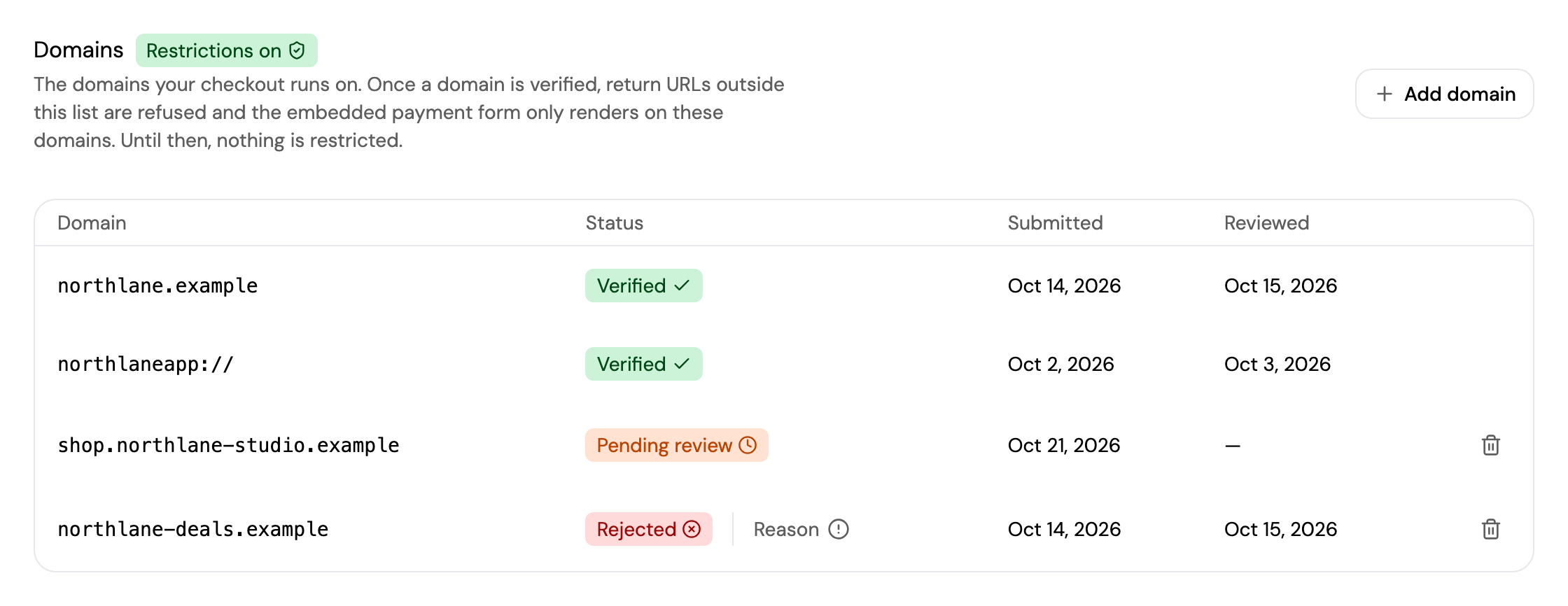
The badge next to the title shows whether your checkout is restricted:
| Badge | Meaning |
|---|---|
| Restrictions on | At least one domain is verified. Your checkout only works on your verified domains. |
| No restrictions | Your checkout isn't restricted yet and works on any domain. |
Each domain has one of these statuses:
| Status | Meaning |
|---|---|
| Pending review | Inflow is reviewing the domain, usually within one business day. |
| Verified | The domain is approved and your checkout can run on it. |
| Rejected | The domain wasn't approved. Click Reason to see why. |
| Revoked | The domain was approved, then withdrawn by Inflow. Contact [email protected] to restore it. |
The table also shows when each domain was Submitted and Reviewed.
Add a Domain
Click Add domain and follow the steps. Enter the domain without https://, for example northlane.example.
- Subdomains are covered. Add your main domain once;
shop.northlane.exampleandwww.northlane.exampleare then included. - App schemes are accepted, such as
northlaneapp://, for checkouts that return to a mobile app. - Add it before you launch on it. Domains are reviewed manually, so a new domain can't be used until it's verified.
Remove a Domain
Click the delete icon next to a domain and confirm. Only domains that are Pending review or Rejected can be removed. You can submit a domain again at any time, for example after a rejection.
Inherited Domains
If your account belongs to a marketplace on Inflow Connect, the marketplace's domains appear under Inherited from your marketplace. They're managed by the marketplace and already count as verified for you.
Updated about 4 hours ago